The short answer first
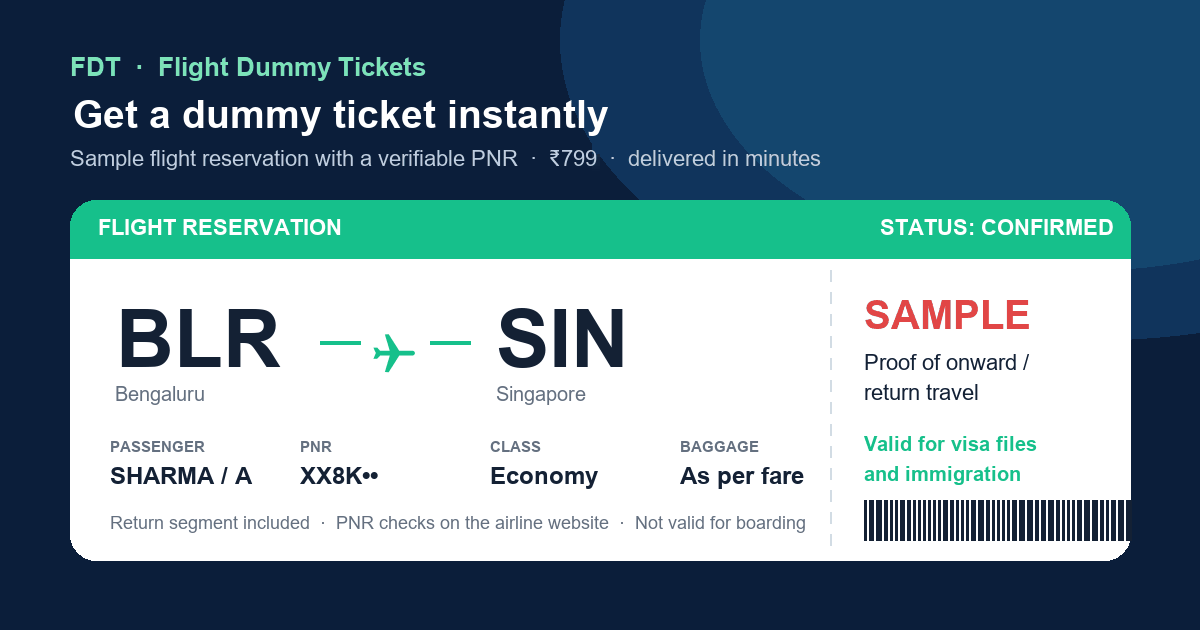
You get a dummy ticket instantly by booking a temporary flight reservation online, entering your route, travel dates and passenger name exactly as in your passport, paying a small flat fee, and receiving the PDF by email and WhatsApp in about ten minutes. That is the whole process. There is no visit to a travel agent, no phone call, no waiting for office hours, and no need to buy a full ticket before your visa is approved. With FDT, the price is ₹799 / $10 flat per passenger, the same for One-Way, Return and Multi-City, and the reservation comes with a verified PNR you can check yourself on the airline's website before you submit it.
A dummy ticket is a temporary flight reservation, not a paid ticket, not for boarding, and it does not guarantee a visa. Instant here means the reservation is made and delivered quickly, not that it is a paid ticket, and not that it lasts forever. Validity is up to 2 weeks, so always check your own reservation expiry, and time the booking close to your VFS appointment. This guide walks through the process step by step, in the order you will actually do it, with the details you need to have ready before you start, the mistakes that slow people down, and the checks to run in the ten minutes after the PDF arrives. Always check your own embassy or VFS checklist before you submit. For UK topics, remember: UK guidance generally says do not routinely submit flight bookings unless transiting, so do not book an instant UK ticket you do not need.
Flight Dummy Tickets, or FDT, provides instant reservations at ₹799 / $10 flat per passenger. Delivery is about 10 minutes, as a PDF by email and WhatsApp, with a verified PNR. Payment is through Razorpay, UPI, cards and net banking, with 5% off every booking and 10% off for 3 or more passengers. Support is at support@flightdummytickets.com and on WhatsApp at +1 786 957 8117. FDT has delivered 20,000+ tickets. Those are the only commercial facts on this page.
Key facts at a glance
| Question | Short answer |
|---|---|
| How fast can I get a dummy ticket? | About 10 minutes with FDT, PDF by email and WhatsApp. |
| What is a dummy ticket? | A temporary flight reservation for visa purposes, not a paid ticket and not for boarding. |
| What do I need before I start? | Passport, route, travel dates, hotel dates, and a payment method. |
| FDT price | ₹799 / $10 flat per passenger, One-Way, Return and Multi-City the same. |
| Validity | Up to 2 weeks. Check your own reservation expiry. |
| Payment | Razorpay (UPI, cards, net banking). 5% off every booking, 10% off for 3+ passengers. |
| Support | support@flightdummytickets.com, WhatsApp +1 786 957 8117. |
| Does it guarantee a visa? | No. No ticket, real or dummy, guarantees a visa. |
| Can I board with it? | No. Buy a real ticket after the visa is approved. |
| What do I check first on arrival? | Name, dates, airports, PNR, and expiry, in that order. |
Before you start: the five things to have ready on your phone
Instant booking is only instant if you have the details ready. Most delays are not caused by the booking system. They are caused by the applicant stopping halfway through to find a passport, to check a hotel date, or to ask a spouse how a name is spelled. Gather five things before you open the booking page, and the whole process will take ten minutes. Gather them after you start, and it will take an hour.
First, the passport, open to the page with the photograph and the name. You need the full name exactly as it is printed, including any middle name, and the exact spelling. Do not type the name from memory. Copy it from the passport, letter by letter. If there are two passengers, you need both passports. If there are four, you need all four. A name typed from memory is the most common source of a correction, and a correction costs time you do not have when the appointment is tomorrow.
Second, the route. Decide the departure city and the arrival city, and, if the trip is multi-city, the city you will leave from. For a simple trip, that is Delhi to Paris and back from Paris. For a multi-city trip, that is Delhi to Paris on the arrival date and Rome to Delhi on the departure date. Check the airports as well. Paris has Charles de Gaulle and Orly. Rome has Fiumicino and Ciampino. Milan has Malpensa and Linate. You do not need to memorise airport codes, but you do need to know which airport you intend to use, because the reservation should show that airport, and it should make sense with your hotel location.
Third, the travel dates, taken from the hotel bookings and the insurance, not from memory. The departure date is the day you intend to fly out. The return date is the day you intend to fly home, which should be the day your hotel stay ends, or the day after, with an explanation. Write the dates down on a piece of paper, or in a note on your phone, before you start. If the hotel booking is for 10 to 22 December, your flight dates are 10 and 22 December. Do not guess. Copy them.
Fourth, the hotel and insurance dates, so you can check the flight dates against them as you book. You do not need to upload the hotel booking to make a flight reservation, but you need to know the dates it covers, so the flight you book matches it. The same applies to insurance. Insurance must cover the whole trip, from departure to return. If you book a flight for dates your insurance does not cover, you will need to fix the insurance later, which costs time.
Fifth, a payment method that works. With FDT, payment is through Razorpay, using UPI, a card, or net banking. Have your UPI app open, or your card ready, before you start. A payment that fails because the card is in another room, or the UPI PIN is forgotten, is a delay that is easy to avoid. Check also that your phone has enough battery and a stable internet connection, because an instant booking on a phone with 2% battery and a weak signal is not instant. Charge the phone, connect to Wi-Fi if you can, and then start.
If you have those five things, you are ready. If you do not, gather them first. The ten minutes you spend preparing will save you thirty minutes of stopping and starting, and it will prevent the spelling mistake that would otherwise require a corrected PDF.
Step by step: the booking itself, in the order you will do it
Open the FDT booking page on your phone or laptop. The page will ask for the route first. Enter the departure city and the destination city. If you are booking a return, enter the return route as well. If you are booking a multi-city trip, enter the arrival city and the departure city for the return, which may be different. Check the cities carefully before you move on, because a wrong city is harder to fix after payment than before it.
Next, enter the travel dates. Enter the departure date and the return date, using the dates you copied from the hotel booking. Check the year as well as the day and month. A date in the wrong year is a mistake that is easy to make when you are in a hurry, and it will make the reservation useless. Check the day of the week if the booking page shows it, because a flight that is shown on a Tuesday when you meant Wednesday is a sign you entered the wrong date.
Next, enter the passenger details. For each passenger, enter the full name exactly as in the passport. Enter the first name and surname in the order the form asks for, and include any middle name if the form asks for it. Do not use a nickname, a shortened name, or a name with a different spelling. If the passport says "Aarav Kumar Patel", enter "Aarav Kumar Patel", not "Arav Patel". If there are children, enter their names with the same care. Parents often check their own name carefully and glance at a child's name. Check the child's name with the same care, because an officer will compare it with the child's passport just as carefully.
Next, review the summary before you pay. The booking page will show a summary of the route, the dates, and the passenger names. Read it slowly, as if you were the officer who will read the PDF. Check the name, the dates, the airports, and the number of passengers. If something is wrong, correct it now, before you pay, because a correction after payment takes longer than a correction before it. This review takes thirty seconds, and it is the most valuable thirty seconds in the whole process.
Next, pay. With FDT, payment is through Razorpay, using UPI, a card, or net banking. The price is ₹799 / $10 flat per passenger, the same for One-Way, Return and Multi-City, with 5% off every booking and 10% off for 3 or more passengers. Choose the payment method that works best for you, complete the payment, and wait for the confirmation. Do not close the page or switch apps until the confirmation appears. If the payment fails, check the payment method and try again, or try a different method. Do not pay twice for the same booking without checking whether the first payment went through. If you are unsure, contact support at support@flightdummytickets.com or on WhatsApp at +1 786 957 8117, with the order details, before you pay again.
Next, wait for the PDF. Delivery is about 10 minutes, by email and WhatsApp. Check both places. The email may go to spam, so check the spam folder if it does not arrive in the inbox within ten minutes. The WhatsApp message will arrive on the number you provided. Open the PDF as soon as it arrives, and do the checks in the next section before you do anything else. Do not forward it, do not upload it, and do not print it until you have checked it.
For the booking steps in more detail, read how to book dummy ticket online. For the price, read dummy ticket price in India. For what a dummy ticket is, read what is a dummy ticket.
The ten minutes after the PDF arrives: check it before you use it
The PDF has arrived. You have ten minutes. Use them to check the document, because a check now is cheaper than a correction later, and a correction now is cheaper than a fresh appointment later. Do the checks in order, and do not skip any of them because the PDF looks fine at first glance.
First, the name. Compare every passenger name on the PDF, letter by letter, with the passport. Check the spelling, the order, and any middle name. If the passport says "Priya Sharma", the PDF should say "Priya Sharma", not "Priya Sharam" or "Priya" only. Check children too.
Second, the dates and times. Check the departure date, the arrival date, the return date, and the year. Check that the return is after the departure, that the dates match your hotel bookings night by night, and that your insurance covers the whole period. Check the airports. Delhi to Paris should be the airport you intend to use, and the return should leave from the city where your trip ends.
Third, the PNR. Go to the operating airline's website, find Manage Booking, enter the PNR and the surname exactly as on the booking, and see what comes back. It should show your name, your flights, and your dates. Take a screenshot for your own records, not to submit, but so you have a note of what you saw and when. If the airline has an app, check there too. For the full steps, read how to verify dummy ticket PNR.
Fourth, the expiry. Look for a validity date, a hold-until date, or a ticketing time limit on the PDF, and note it in your phone calendar. With FDT, validity is up to 2 weeks, and you should check your own reservation expiry. If your appointment is after the expiry, you need a fresh reservation for the new dates. Do not submit an expired one.
Fifth, the file itself. Open the PDF, look at every page, and check that nothing is cut off, blurred, or missing. Check that the PNR is legible and that the PDF is not a photograph of a screen. Check the file size and format against the portal instructions if you are uploading it. Print a copy if you are submitting in person, and check the print as well. For what to check in the PDF, read dummy ticket PDF check before upload.
If all five checks pass, you have a genuine, verifiable reservation, and you can upload or print it. If any check fails, contact support with the PNR and the exact error, and ask for a corrected PDF. Do not edit the PDF yourself. Never edit a booking document. Get a corrected PDF from the seller.
When instant is the right choice, and when it is not
Instant booking is the right choice when your appointment is tomorrow, or in a few days, and you need a reservation that is live when the officer sees it. It is the right choice when your travel dates have just been confirmed, and you need a document that matches them. It is the right choice when a previous reservation has lapsed, and you need a fresh one for the same dates. It is the right choice when you are at an airport and need proof of onward travel, provided that is what the situation actually requires and you have checked the requirement. In all of those cases, the speed of an instant reservation is a benefit, because the reservation is fresh, and freshness is what matters for a temporary hold.
Instant booking is not the right choice when you do not yet know your travel dates, or when your hotel dates have not been confirmed, or when you have not yet checked your embassy checklist. Booking instantly with the wrong dates is worse than booking slowly with the right dates, because a reservation for the wrong dates will need to be replaced, and the replacement will take time you may not have. If you do not know the dates, wait until you do. The booking itself takes ten minutes. The planning that makes the booking correct takes longer, and it should not be rushed.
Instant booking is also not the right choice when the destination does not require a flight booking at all. For a standard UK visitor visa, UK guidance generally says do not routinely submit flight bookings unless transiting. Booking an instant UK ticket because it is fast, when you do not need a booking at all, is a waste of money and a document that should not be in the file. Check the guidance on gov.uk and your own checklist first, and read dummy ticket for UK visa. If you are transiting, and a booking is requested, then an instant, verifiable reservation is the right document.
Instant booking is also not a substitute for checking the rest of the file. A flight reservation that arrives in ten minutes does not fix a bank statement that does not support the trip, or a cover letter that does not explain the purpose of travel. Those documents take thought, and they should not be rushed because the flight document was fast. Use the time you saved on the flight reservation to spend more time on the cover letter, the bank statements, and the travel plan. That is where the visa decision is actually made.
Book your dummy ticket, ₹799 flat
One-Way, Return or Multi-City, with a verified PNR. Delivered in about 10 minutes by email and WhatsApp.
Book Dummy Ticket, ₹799 WhatsApp UsLast-minute and same-day appointments: a practical timeline
A last-minute appointment is the situation where instant booking matters most, and it is also the situation where mistakes are most likely, because the applicant is under time pressure. A practical timeline will help you use the time you have, rather than losing it to panic.
If your appointment is tomorrow morning, start tonight, not tomorrow morning. Gather the passport, the route, the travel dates from the hotel booking, and a payment method, tonight. Book the reservation tonight, check the PNR tonight, and check the name, dates, and expiry tonight. That leaves tomorrow morning for the rest of the file, the cover letter, the photographs, the printouts, rather than for the flight reservation. A reservation booked tonight will be live tomorrow morning, because validity is up to 2 weeks, and it will still be live for the initial review that follows.
If your appointment is today, and you have just been given a slot that opened up, book the reservation now, from your phone, with the details you have ready. Choose the route and dates from the hotel booking, enter the names from the passport, pay, and check the PNR as soon as the PDF arrives. That takes about ten minutes for the booking and ten minutes for the check. Do not skip the check because you are in a hurry. A reservation that has not been checked is a reservation that may have a spelling mistake you will only discover at the centre, when it is too late to fix it.
If you are at the VFS centre already, and you realise the flight document is missing or wrong, do not generate a PDF from a free website in the waiting area. That PDF will have no PNR, and it will fail a check if one is run. Instead, book a genuine reservation from your phone, in the waiting area if you have time, or ask the staff whether you can provide the document later, through the proper channel, and book it as soon as you leave. A genuine reservation made after the appointment, and submitted through the proper channel, is better than a generated PDF submitted on time. Read dummy ticket last minute same day appointment for how to handle a same-day appointment without a shortcut, and free dummy ticket generator risks for why a generator is not a solution in this situation.
If your appointment was postponed, check whether the reservation is still live. If it has lapsed, book a fresh one for the same travel dates, a few days before the new appointment. That is a normal request, and it takes ten minutes. Do not submit the expired reservation and hope nobody notices the expiry.
One-way, return and multi-city in ten minutes
An instant reservation can be made for any shape of trip, and the shape should match the trip you are actually taking. With FDT, the price is the same, ₹799 / $10 flat per passenger, for One-Way, Return and Multi-City, so the shape does not affect the cost or the speed. That matters, because it removes the incentive to choose the wrong shape to save time or money.
A one-way reservation shows only the outward flight. It is appropriate in a small number of cases, for example when you are travelling onward by another means, or when your return is genuinely undecided and your checklist does not require a return. For most tourist visas, a one-way reservation is not enough, because the checklist asks for a return or onward journey. Do not choose a one-way reservation because it is simpler to book. Choose it only if your checklist and your plan support it, and explain the onward plan in your cover letter. Read onward travel proof explained for how onward travel is normally shown.
A return reservation shows the outward and return flights on the same booking. It is the most common shape for a tourist trip, because it shows both entry and exit, and it matches the hotel bookings night by night. If you are flying Delhi to Paris and back from Paris, a return reservation is the right shape. The return date should be the day your hotel stay ends, or the day after, with an explanation if it is later.
A multi-city reservation shows entry into one city and exit from another, for example Delhi to Paris on the arrival date and Rome to Delhi on the departure date. It is the right shape for a trip that visits more than one country, which is the most common first Europe trip for Indian applicants. The multi-city reservation should show both sectors on the same PNR, with the same passenger names, so the officer can see the whole journey at a glance. The hotel bookings should cover every night in each city, in order, and the cover letter should state the cities and the number of nights in each. Read dummy ticket hotel booking match dates for how to line up multi-city dates.
Families, students and workers: booking instantly for more than one person
Booking instantly for a family is the same process as booking for one person, with one difference: all passengers should be booked together, at the same time, for the same flights, so the PNR check shows the whole group travelling together. A genuine reservation for a family of four will show four names under one PNR, with the same outward and return sectors. If you book each person separately, at different times, the reservations may be for different flights, or for different dates, because the dates were entered separately and one of them was a day out. Book the family together, check every name, and check the PNR once for the whole group. With FDT, the price is ₹799 / $10 flat per passenger, with 10% off for 3 or more passengers, so a family booking is cheaper per person than a single booking. Read dummy ticket for family group booking for how a group booking is normally structured.
For a student, instant booking is useful when the admission letter has just arrived and the appointment is soon. The flight should arrive a few days before the course starts, not after it, and the return should match the visa duration or an onward plan explained in the cover letter. Book the flight dates from the admission letter, not from memory, and check them against the hotel or accommodation dates. Read dummy ticket for student visa for the student-specific points.
For a worker, instant booking is useful when the employment contract has just been signed and the start date is fixed. The flight should arrive before the start date, with enough time to settle in. Book the dates from the contract, not from memory. Read dummy ticket for work visa for how a work file is structured.
For a tourist on a first trip, instant booking removes the anxiety of waiting for a travel agent to reply. You can book at midnight, check the PNR at midnight, and have the document ready for an appointment the next morning. That speed is valuable, but it should not be used to skip the preparation. Gather the passport, the route, and the hotel dates first, then book. The booking is instant. The preparation is what makes it correct.
Schengen, the United States and other destinations: where instant booking fits
For Schengen, an instant reservation is the standard way to meet the checklist requirement for proof of travel. Most Schengen checklists ask for a flight reservation or itinerary, not a paid ticket, and a genuine temporary reservation with a verifiable PNR meets that requirement. The hub guide, dummy ticket for Schengen visa, explains the requirement, and the country guides for dummy ticket for France visa, dummy ticket for Germany visa, dummy ticket for Italy visa, dummy ticket for Spain visa and dummy ticket for Switzerland visa show how it is worded for the most visited countries. If you are visiting more than one Schengen country, your reservation should show entry into the first country and exit from the last.
For the United States, a B1/B2 visa is decided largely at the interview, and applicants are generally advised not to buy a full ticket before approval. An instant reservation can be useful to show a plan, especially if you have a clear itinerary, but it is not the centrepiece of the file. If you include one, make it genuine, know the flight number and time, and be able to explain why you chose those dates. Read dummy ticket for USA B1/B2 visa before you decide what to include.
For Canada, Australia, Dubai and Thailand, an instant reservation is commonly used, and the same checks apply: PNR, dates, hotels, insurance, and cover letter. The guides for dummy ticket for Canada visa, dummy ticket for Australia visa, dummy ticket for Dubai visa and dummy ticket for Thailand visa set out what each destination expects. In every case, check your own embassy or VFS checklist on vfsglobal.com where VFS handles the application.
For the United Kingdom, UK guidance generally says do not routinely submit flight bookings unless transiting. That means for a standard UK visitor visa, you should not book an instant flight ticket at all, however fast it is. Check the current guidance on gov.uk and your own checklist, and read dummy ticket for UK visa. If you are transiting, and a booking is requested, then an instant, verifiable reservation is the right document.
The mistakes that make instant booking slow
Instant booking becomes slow when the applicant makes one of a small number of mistakes, all of which are easy to avoid. The first is starting without the passport. The applicant opens the booking page, enters a name from memory, and then realises the spelling is wrong when they check the passport later. The fix is to have the passport open before you start.
The second is starting without the hotel dates. The applicant books a flight for dates that do not match the hotel, and then has to book a fresh reservation for the correct dates. The fix is to copy the dates from the hotel booking before you start.
The third is paying twice. The applicant pays, does not see a confirmation immediately, assumes the payment failed, and pays again. The fix is to wait for the confirmation, check the email and WhatsApp, and contact support before you pay again if you are unsure.
The fourth is using a free generator because it feels faster than a genuine booking. A generator produces a PDF in two minutes, but the PDF has no PNR, and it will fail a check if one is run. A genuine reservation takes about ten minutes, and it can be checked. The generator is not faster in the sense that matters. It is faster at producing a document that does not work. Do not use it.
The fifth is skipping the PNR check because you are in a hurry. The check takes two minutes, and it is the most important check in the whole process. Skipping it to save two minutes is a poor trade, because a PNR that does not work will cost you days later, when the file is held or returned.
The sixth is booking too early. An instant reservation is valid for up to 2 weeks, so booking it a month before the appointment means it will have lapsed by the time the officer sees it. Book a few days before the appointment, not weeks before, and check the expiry. For how long a reservation lasts, read dummy ticket validity how long. For the wider mistakes that lead to refusals, read dummy ticket mistakes visa rejection.
What happens after you get the ticket instantly
After the PDF arrives and you have checked it, the next step is to use it correctly in the file. Upload the PDF to the portal, or print it for an in-person submission, and make sure it is the current PDF, for this trip, for these passengers, not an old PDF from a previous trip. Rename the file clearly if you have several PDFs in your downloads folder, so you do not upload the wrong one by mistake.
Check the file you upload. Open it, read the name, the dates, and the PNR, and make sure it is legible. Check the file size and format against the portal instructions. If the portal asks for a JPG, convert the PDF properly, do not photograph it. If you are submitting in person, print the PDF and check the print, because a PDF that looks fine on a phone can print with a margin that cuts off the PNR.
Update the cover letter to match the reservation. The cover letter should state the travel dates, the cities, and the purpose, and those statements should match the flight, hotel, and insurance documents exactly. Write the cover letter from the documents, not from memory. Copy the dates from the PDF.
After the visa is approved, buy a real ticket. The instant reservation was a planning document, not a travel document. Its job ends when the visa is stamped. Check the visa validity dates, compare the real ticket options, and buy a real ticket for travel within the visa validity. Do not try to use the reservation to board a flight. It will not work, and trying to use it that way will cause a problem at the airport.
Official guidance to check alongside this guide: the European Commission Schengen guidance on ec.europa.eu, VFS Global on vfsglobal.com, and UK visa guidance on gov.uk. Those sources tell you what your embassy actually asks for. A blog can explain how to get a dummy ticket instantly, but only the official checklist can tell you what applies to your appointment.
Paying in minutes: UPI, cards and net banking, and what to do when payment fails
Payment is the step where instant booking most often stalls, not because the system is slow, but because the applicant has not prepared the payment method, or because a payment fails and the applicant does not know what to do next. With FDT, payment is through Razorpay, using UPI, a card, or net banking, and the price is ₹799 / $10 flat per passenger, with 5% off every booking and 10% off for 3 or more passengers. That is the total for the reservation, not a teaser for a later charge. Understanding how each payment method works will help you choose the one that is fastest for you, and knowing what to do when a payment fails will help you recover in minutes rather than hours.
UPI is the fastest method for most Indian applicants, because it does not require a card number, an expiry date, or a CVV. You enter your UPI ID, or you scan a QR code, or you approve the payment in your UPI app, and the payment is confirmed in seconds. Have your UPI app open before you start, and make sure you know your UPI PIN. A UPI payment that fails because the PIN was entered wrong three times will lock the UPI for a short time, so enter the PIN carefully, once, rather than rushing it. If the UPI payment fails, check whether the amount was deducted. If it was deducted, do not pay again immediately. Wait a few minutes, check the email and WhatsApp for the PDF, and contact support if the PDF does not arrive. A deducted payment that does not produce a PDF is a payment to query, not a payment to repeat.
A card payment is the next fastest method, provided the card is in your hand and you know the details. Enter the card number, the expiry date, the CVV, and the name on the card, and complete the OTP step if your bank requires it. Have the phone that receives the OTP nearby, and enter the OTP promptly, because OTPs expire quickly. A card payment that fails because the OTP expired is a common delay, and it is avoided by having the phone ready before you start. If the card is a credit card, check the credit limit. If it is a debit card, check the balance. A payment that fails because the limit is exceeded is not a system error. It is a limit issue, and it is fixed by using a different card or a different method.
Net banking is the slowest of the three methods, because it requires you to log in to your bank, enter a password, and complete an OTP or a grid authentication. It is a reliable method, but it is not the fastest, and it should not be your first choice if your appointment is in a few hours and you need the PDF in ten minutes. Use net banking if UPI and cards are not available, or if your bank does not support the other methods for international payments. Have your net banking login details ready before you start, and do not start the booking if you have forgotten the password, because resetting it will take longer than the booking itself.
If a payment fails for any reason, do not panic, and do not pay again without checking. First, check whether the amount was deducted from your account. If it was not deducted, the payment did not go through, and you can try again, with the same method or a different one. If it was deducted, wait ten minutes and check the email and WhatsApp for the PDF. The booking may have been created even though the confirmation page did not load. If the PDF does not arrive, contact support at support@flightdummytickets.com or on WhatsApp at +1 786 957 8117, with the order details, the payment receipt, and the time of payment, and ask for the status. Keep the payment receipt, the order number, and any correspondence. That evidence will help support to find the booking, or to arrange a refund if the booking was not created.
Do not pay a second time for the same booking without checking the first payment, because a double payment for the same reservation is a double charge that will need a refund, and a refund takes time. If you are unsure whether the first payment went through, contact support first. That contact takes a few minutes, and it is faster than disputing a double charge later. Support is there for exactly this situation, and a genuine seller will answer with specifics about the order, not with vague reassurance.
Booking from your phone, from a laptop, and from a place with weak internet
Most applicants book from a phone, because the phone is always with them, and the booking page is designed to work on a phone. Booking from a phone is fast, provided the phone has a stable connection and enough battery. Before you start, charge the phone, connect to Wi-Fi if you can, and close other apps that may use data in the background. A booking that fails because the connection dropped halfway through is a booking that will need to be started again, and the details will need to be entered again. That is a delay that is easy to avoid by checking the connection first.
Booking from a laptop is also fast, and it has one advantage: the screen is larger, so the summary page is easier to read, and the name and dates are easier to check. If you are booking for a family of four, with four names to enter, a laptop may be easier than a phone, because the keyboard is larger and the form is easier to navigate. The disadvantage is that a laptop may not have the UPI app, so payment may need to be by card or net banking, or by scanning a QR code with your phone. Choose the device that is easiest for you, not the device that is fastest in theory. The booking takes ten minutes on either device, provided the details are ready.
Booking from a place with weak internet, a train, a bus, a rural area, or a building with poor signal, is the hardest case, and it is worth planning for. If you know the internet is weak, do not start the booking until you are in a place with a stable connection. A booking that is interrupted by a dropped connection may create a partial order, or a payment that is deducted without a confirmation. That is a problem that takes time to resolve. Wait until you have a stable connection, even if that means waiting an hour, because an hour of waiting is better than a day of fixing a failed booking. If you are at an airport with free Wi-Fi, use it, but be careful about entering payment details on a public network. Use your mobile data for the payment step if you can, or use a network you trust.
If you are booking for someone else, a parent, a spouse, or a child, make sure you have their passport, their travel dates, and their consent to use their details and to pay for the booking. Do not book for someone else without their passport in front of you, because you will need the exact spelling of their name. Do not use your own name for their booking, and do not use their name for your booking. Each passenger needs their own name, exactly as in their own passport, on the same reservation if they are travelling together.
What instant does not mean: three misunderstandings to avoid
Instant delivery is often misunderstood, and the misunderstandings cause problems that are easy to avoid if they are named clearly. The first misunderstanding is that instant means the reservation lasts forever. It does not. Validity is up to 2 weeks with FDT, and you must check your own reservation expiry. An instant reservation made a month before the appointment will have lapsed by the time the officer sees it, however quickly it was delivered. Instant refers to delivery, not to duration. Book close to the appointment, not early because it was easy to book.
The second misunderstanding is that instant means the reservation is a paid ticket. It is not. A dummy ticket is a temporary flight reservation, not a paid ticket, not for boarding, and it does not guarantee a visa. Instant delivery does not change what the document is. It is still a reservation, held for a short time, with a verified PNR. You will still need to buy a real ticket after the visa is approved. Do not present the instant reservation as a paid ticket, and do not try to use it to board a flight.
The third misunderstanding is that instant means no checking is needed. It does not. An instant reservation needs the same checks as any other reservation: name, dates, airports, PNR, and expiry. The fact that it arrived in ten minutes does not make it correct. It makes it fast. Correctness comes from the checks you run after it arrives, not from the speed with which it was delivered. Spend ten minutes checking it, even if you are in a hurry, because those ten minutes are the difference between a document you can defend and a document you have to hope nobody checks.
There is a fourth misunderstanding that is worth naming, which is that instant means free. It does not. A genuine instant reservation costs a small flat fee, ₹799 / $10 with FDT, because a real hold is made in a booking system. A free instant PDF is almost always a generated document with no reservation behind it. It is instant because it is a template, not because a reservation was made. Do not confuse speed with genuineness. A genuine reservation is fast because the system is automated. A generated PDF is fast because nothing was booked. The test is the PNR check, not the delivery time. If the PNR works on the airline's site, the reservation is genuine, however quickly it arrived. If it does not work, the document is not a reservation, however quickly it was delivered.
A final walk-through: from idea to submission in one evening
Imagine you have a VFS appointment on Friday morning, and it is Wednesday evening. You have the passport, the hotel bookings for Paris and Rome, and the insurance, but no flight document yet. You sit down at 8 p.m. with your phone, the passport open beside you, and the hotel dates written on a piece of paper: 10 December to 22 December, five nights in Paris, seven nights in Rome. You open the FDT booking page, enter Delhi to Paris on 10 December and Rome to Delhi on 22 December, enter your name exactly as in the passport, and your spouse's name exactly as in theirs, review the summary, and pay ₹799 per person by UPI, with 5% off. The PDF arrives by email and WhatsApp in about ten minutes. You open it, check the names letter by letter, check the dates against the hotel, go to the airline's website, enter the PNR and your surname, and see the booking. You note the expiry in your phone calendar, print a copy, and put it with the rest of the file. At 8.30 p.m., the flight document is done, checked, and ready. You spend the rest of the evening on the cover letter, which is the document that actually needs thought, because the flight document no longer needs any.
That evening is the whole point of instant booking. It is not about speed for its own sake. It is about removing a task that used to take a visit to a travel agent, a phone call, and a day of waiting, and turning it into a ten-minute task that you can do yourself, at home, in the evening, with the documents you already have. The time you save is not the point. The point is that the document is genuine, verifiable, and ready when you need it, without the anxiety of waiting for someone else to send it. That is what instant means, when it is done properly: a real reservation, delivered quickly, checked by you, and ready to submit.
Ready to book?
Get your dummy ticket for ₹799 per passenger, with a verified PNR, in about 10 minutes.
Book Dummy Ticket, ₹799Dummy ticket options compared
Use this when you are deciding between a free generator PDF, a fully paid ticket, and a verifiable reservation.
| Option | Airline-checkable PNR | Typical cost | Best for |
|---|---|---|---|
| Free PDF generator | No | ₹0 | Never for embassy/VFS upload |
| Fully paid ticket | Yes | Full airfare | When dates are locked and refundable |
| FDT verifiable dummy ticket | Yes | ₹799 / passenger | Visa file before dates are final |
Official sources to check before you apply
Always match your documents to the embassy or VFS checklist for your nationality. These are the primary references we used while writing this page:
Frequently asked questions
1. How do I get a dummy ticket instantly? Book a temporary reservation online, enter passport names and dates, pay, and receive the PDF in about 10 minutes.
2. How much is an instant FDT dummy ticket? ₹799 / $10 flat per passenger, One-Way, Return and Multi-City the same.
3. How long is it valid? Up to 2 weeks. Check your own reservation expiry.
4. Can I board a flight with a dummy ticket? No. It is not a paid ticket and cannot be used for boarding.
5. Does it guarantee a visa? No. No ticket guarantees a visa.
6. What do I need before booking? Passport, route, travel dates from hotel bookings, and a payment method.
7. How do I verify it? Enter the PNR and surname on the airline's Manage Booking page.
8. Should I submit a flight booking for a UK visa? UK guidance generally says do not routinely submit flight bookings unless transiting.
9. What if payment fails? Check if the amount was deducted, wait ten minutes, then contact support before paying again.
10. Can I book for a family instantly? Yes. Book all passengers together under one PNR, with 10% off for 3 or more.
11. What if my appointment is postponed? Check the expiry and get a fresh reservation for the same dates if needed.
12. When do I buy a real ticket? After the visa is approved, for travel within the visa validity dates.